

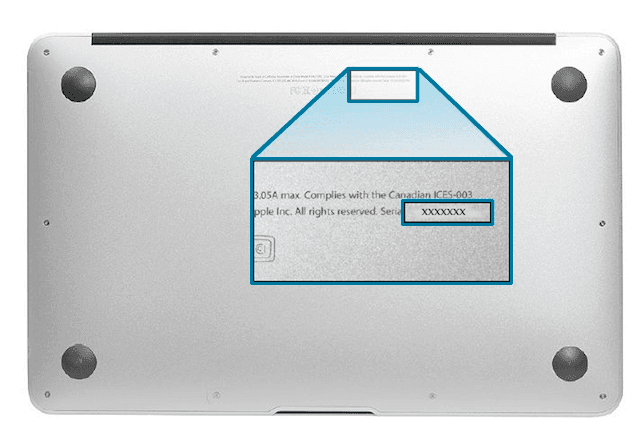
The serial number (numărul de serie) is the unique identifier for any Apple device — iPhone, MacBook, iPad, Apple Watch, or AirPods. Unlike the IMEI (specific to phones), the serial number exists on all Apple products and contains information about warranty, configuration, and authenticity.
If you are buying a second-hand Apple device, checking the serial number is as important as checking the IMEI for phones.
What is the Apple serial number and what information does it contain
The Apple serial number is an 11-character alphanumeric code (older models) or 12 characters (newer models). Its structure encodes:
- **Place of manufacture** (the first characters identify the factory)
- **Week and year of production**
- **Specific configuration** (storage capacity, color, hardware version)
- **Unique sequence number** of the device
By checking the serial number on Apple's servers, you can find out exactly what warranty the device has and if AppleCare+ is active.
How to find the serial number on Apple devices
iPhone and iPad - **Settings → General → About** → "Serial Number" field - On the **SIM tray** (on some models) - On the **back of the device** (older iPhone models) - On the **original box** (on the barcode label)
MacBook (Pro, Air, Mac mini, iMac) - Click on the **Apple menu → About This Mac** → the serial number appears - On the **underside of the laptop** (engraved on the casing) - In the **System Information app** - On the **original box**
Apple Watch - **Settings → General → About** on the watch - On the **back of the casing** (engraved) - On the **original box**
AirPods - On the **charging case** (in the battery compartment) - Via **Settings → Bluetooth** on iPhone → select AirPods → "i" → Information
What you can check with the Apple serial number
Warranty and AppleCare+
This is the most important check. On checkcoverage.apple.com, enter the serial number and see:
- If the standard warranty (1 year) is active or expired
- If AppleCare+ (extended warranty 2-3 years) is active
- The exact warranty expiration date
- If the device is eligible for Apple phone support
Why it matters: A MacBook with an active warranty is worth 10-15% more than one without a warranty. Make sure the warranty matches what the seller states.
Device authenticity
An invalid serial number or one that does not return data from Apple's systems may indicate:
- Counterfeit device (fake)
- Modified serial number (illegal)
- Device not officially distributed in Europe
Checking authenticity is critical, especially for refurbished MacBooks and iPhones purchased from unofficial sources.
Exact configuration and model
The decoded serial number shows you: - The exact model (e.g., MacBook Pro 14" M3 Pro 18GB RAM 512GB SSD) - The color and finish - The exact hardware version - The country/region for which the device was manufactured
This is important to verify if the specifications match what the seller advertises.
Serial number check on Codat.ro
The Codat.ro platform offers comprehensive serial number checks for Apple devices. The report includes all available information — warranty, configuration, exact model, and authenticity indicators — delivered in less than 60 seconds.
Serial number checks are available for: - iPhone (all models) - iPad (all models) - MacBook Pro and MacBook Air - Mac mini and iMac - Apple Watch - AirPods
The difference between serial number and IMEI on iPhone
The iPhone has both identifiers:
| Identifier | Main purpose | Where to find it | |---|---|---| | IMEI | Mobile network, theft blacklist | #06#, Settings → General → About | | Serial Number | Apple warranty, configuration, authenticity | Settings → General → About, back/SIM tray |
For a complete check of a second-hand iPhone, you need both checks — IMEI for network status and blacklist, and serial number for warranty and configuration.
Common Errors When Checking the Serial Number
"Invalid Serial Number" on Apple's Website
This could mean you entered it incorrectly (confusion between 0 and O, 1 and I, l and 1). Re-enter it carefully. If the error persists, the device might be counterfeit or the serial number may have been altered.
Warranty Doesn't Match What the Seller Says
If the seller claims the iPhone "still has 8 months of warranty" but the check shows it's expired, either the seller is lying or they are confusing the manufacturer's warranty with a personal warranty they've provided. Clarify before purchasing.
Serial Number from Another Region
If the check shows the device was manufactured for the USA, Japan, or China, verify if it has all the necessary features for Romania (5G on the correct bands, dual SIM, etc.).
Frequently Asked Questions About Apple Serial Numbers
Can the Serial Number Be Falsified?
Technically yes, but a falsified serial number will not return valid data from Apple's systems. Checking on checkcoverage.apple.com or Codat.ro detects inconsistencies.
Can I Transfer AppleCare+ Warranty to a New Owner?
Yes, AppleCare+ is transferable with the device. The new owner benefits from the remaining warranty.
What Do I Do If an Apple Device Has Warranty But Was Unauthorizely Repaired?
Unauthorized repairs (third-party parts) can void the Apple warranty. Serial number checks do not show repair history, but an authorized Apple service can perform a physical inspection.
Is Serial Number Checking Free?
Basic warranty checking is free on checkcoverage.apple.com. For a complete report with all configuration and authenticity details, Codat.ro offers dedicated services at affordable prices.