

When you buy a second-hand iPhone, the first thing you check is its physical condition: the screen, battery, cameras, casing, or if the phone turns on normally. But some problems aren't visible at first glance.
An iPhone can look flawless, appear to function normally, but have hidden restrictions, locks, or risks that only appear after a reset, activation, or update.
One of the most important checks is MDM Lock.
On codat.ro, you can quickly check if a device has an MDM risk, as well as other important statuses like iCloud / FMI, blacklist, SIM Lock, warranty, country of sale, or activation status.
What does MDM mean?
MDM stands for Mobile Device Management.
In short, MDM is a system used by companies, schools, or organizations to manage phones, tablets, or laptops remotely.
Apple explains that MDM allows for secure, wireless configuration of devices by sending profiles, settings, and commands to the device. Through MDM, settings can be modified, software updated, compliance with organizational policies verified, and, in some cases, the device can be remotely locked or erased.
Put simply:
an iPhone with MDM can be tied to a company, school, or institution that still has administrative rights over it.
Simple Example
Imagine a company buys 100 iPhones for its employees.
The company can use MDM to:
automatically install work applications;
block certain functions;
set up email accounts;
configure Wi-Fi or VPN;
restrict the App Store, AirDrop, or other features;
erase or lock the phone if it's lost;
control what the user can and cannot do on that device.
Apple mentions that supervised devices offer organizations additional control over configuration and restrictions. Typically, supervision indicates that the device is owned by the organization.
The problem arises when such a phone ends up on the second-hand market without being properly removed from the company's system.
Why is MDM Lock a problem?
MDM doesn't necessarily mean the phone is stolen or immediately unusable. Sometimes, the device may function normally for a period.
The issue is that an iPhone with MDM can have restrictions or may require configuration through the organization that manages it.
In practice, the risk primarily appears after:
a full reset;
an iOS update;
activation as a new phone;
changing accounts;
restoration from iTunes / Finder;
configuration after data erasure.
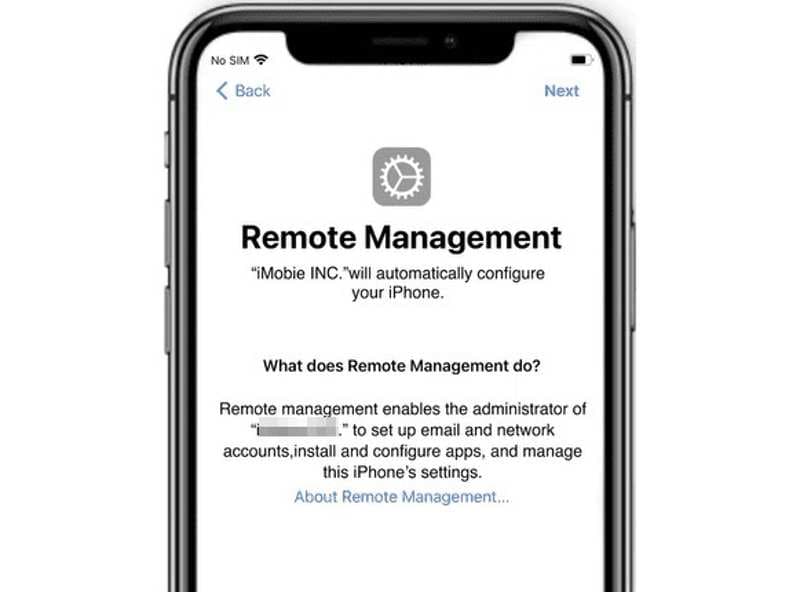
In some cases, after a reset, the phone may display the Remote Management screen. This means the device is trying to re-enroll in the organization's system.
For the buyer, this can mean the phone cannot be fully used or that certain functions are controlled by someone else.
What does MDM look like on an iPhone?
Sometimes, you can see clues directly on the phone.
For example, in settings, you might see:
Settings → General → VPN & Device Management
Apple states that installed profiles can be viewed in the Settings > General > VPN & Device Management menu, and if you delete a profile, the associated settings, apps, or data are also deleted.
You might also encounter messages like:
This iPhone is supervised and managed
Remote Management
This iPhone is managed by…
Management Profile
Device Management
But here's the important part: the absence of a profile in the menu doesn't always guarantee everything is in order. Some situations only become visible after a reset or activation.
Therefore, for second-hand phones, checking via IMEI / Serial Number is very important.
Is MDM the same as iCloud Lock?
No. They are different things.
MDM Lock pertains to device management by a company, school, or organization.
iCloud Lock / Activation Lock pertains to the owner's Apple ID and the Find My function.
Apple explains that Activation Lock is included in Find My and is designed to prevent others from using an iPhone or iPad if the device is lost or stolen. Activation Lock is automatically enabled when Find My is turned on.
In short:
MDM = phone managed by an organization.
iCloud / FMI ON = phone linked to a person's Apple ID.
Blacklist = phone reported or restricted on networks.
SIM Lock = phone locked to a specific network.
These are all different risks, but they can all affect the phone's usability or resale value.
Why does MDM matter when buying a second-hand iPhone?
Because a phone with MDM can seem perfect during a quick inspection.
It might have:
a good screen;
a good battery;
functional cameras;
functional Face ID;
signal;
Wi-Fi;
a logged-out Apple ID.
But the problem can appear after a reset.
A normal buyer might think they've purchased a good phone, only to discover a few hours or days later that the device requires management from a company.
Therefore, checking MDM before purchasing is one of the most crucial checks for second-hand iPhones.
What can an administrator do via MDM?
Depending on how the device is configured, MDM can allow the administrator to send settings, profiles, and commands to the phone. Apple mentions that MDM can be used for device configuration, compliance monitoring, software updates, and even remote locking or erasure.
This doesn't mean that every phone with MDM is actively controlled at that moment. But it means the device can have an administrative link that should not be ignored.
For a regular user, the risk is simple:
you buy a phone, reset it, and then discover you can't configure it freely.
Can MDM be removed?
It depends heavily on the situation.
If the phone is still legally associated with a company or institution, only that organization can correctly remove it from the management system.
It is not recommended to buy phones that promise "MDM bypass" or "MDM remove" through dubious methods. Often, these methods are temporary, unstable, or may disappear after a reset / update.
The safest approach is to check the phone before you buy it.
How does codat.ro help you?
On codat.ro, you can check a device using its IMEI or Serial Number.
The platform helps you get important information about the phone before you buy, sell, or service it.
The check is especially useful for:
second-hand iPhones;
phones bought from OLX, Marketplace, or pawn shops;
phones brought from abroad;
devices received in exchange;
GSM stores;
service centers;
resellers;
individuals who want to avoid losses.
What can you check on codat.ro, besides MDM?
1. MDM Lock
You can check if the device has an MDM management risk.
A negative result is important because it shows that the phone does not appear to be associated with a company or institution's management system.
A positive result should be treated with caution, as the phone may have restrictions or require Remote Management after a reset.
2. iCloud / FMI Status
FMI stands for Find My iPhone.
If FMI is ON, the phone may still be linked to the former owner's Apple ID.
Activation Lock is an Apple feature designed to protect lost or stolen devices, and Apple specifies that it is automatically enabled when Find My is turned on.
For a buyer, an iPhone with FMI ON can be a serious problem if the former owner does not remove it from their Apple ID.
3. Lost / Stolen Status
You can check if the device is reported as lost or stolen.
This check is very important before purchasing, especially when the phone comes without documentation, without its box, or from an unknown person.
4. Blacklist / GSMA Status
Blacklist status can indicate that the phone has restrictions on mobile networks.
A blacklisted phone may have issues with signal, activation on certain networks, or SIM card usage.
This check is particularly useful for phones brought from other countries.
5. SIM Lock
SIM Lock shows whether the phone is network-unlocked or locked to a carrier.
An iPhone locked to a network can only work with specific SIM cards.
If you want to use the phone in Romania, it's important to know if it's unlocked or locked to a network in another country.
6. Warranty Status
You can check if the phone still has an active warranty or if the warranty has expired.
This information is useful for estimating the device's actual value.
7. Activation Date
The activation date can help you better understand the phone's history.
For example, a phone sold as "new" but activated a long time ago should be checked carefully.
8. Replaced by Apple
You can check if the device has been replaced by Apple.
This status can be important when buying, as some devices have a history of replacement under warranty or service.
9. Sale Country / Ship To Country
You can check the country for which the phone was intended or shipped.
This information is particularly useful for devices brought from the US, Asia, UK, or other markets, where there may be differences in network, warranty, or configuration.
Why check the phone before buying?
Because a check done beforehand can save you lost money.
An iPhone with hidden problems can mean:
a phone locked after reset;
active iCloud;
MDM / Remote Management;
a phone reported lost or stolen;
blacklist;
network lock;
expired warranty;
uncertain origin;
significantly lower resale value.
An IMEI check costs little compared to losing money on a wrongly purchased phone.
Who is MDM verification useful for?
MDM verification is useful for anyone buying or selling Apple devices.
It is especially recommended for:
buyers of second-hand iPhones;
GSM stores;
GSM service centers;
pawn shops;
resellers;
companies buying phones in bulk;
individuals buying from OLX, Facebook Marketplace, or other platforms;
technicians receiving phones for service.
How to perform the check on codat.ro?
The process is simple:
Go to codat.ro.
Choose the desired check.
Enter the IMEI or Serial Number.
Receive the check results.
Make an informed decision whether the phone is worth buying or not.
You don't need advanced technical knowledge. The results are designed to be clear and easy to understand.
How to find an iPhone's IMEI?
You can find the IMEI in several ways:
in the Phone app, dial *#06#;
in Settings → General → About;
on the phone's box;
in some cases, on the SIM tray;
in your Apple ID account, if the device is associated.
For an accurate check, ensure the entered IMEI is complete and has no incorrect digits.
MDM in short
MDM is not a simple setting. It is a real management system used by organizations to control devices.
Apple describes MDM as a method by which administrators can configure devices, send profiles and commands, update settings, monitor compliance, and apply restrictions.
For a regular user, the conclusion is simple:
If an iPhone has active MDM or a risk of Remote Management, it must be checked very carefully before purchasing.
Conclusion
A second-hand iPhone should not only be checked physically. It must also be checked digitally.
MDM Lock is one of the most significant hidden problems that can occur with an iPhone. The phone may appear to work normally at first glance, but after a reset, it may request Remote Management or have restrictions imposed by an organization.
With codat.ro, you can quickly check MDM and other important statuses, such as iCloud / FMI, blacklist, SIM Lock, warranty, Activation Date, Replaced by Apple, or country of origin.
Before you buy a phone, check it.
It's easier to prevent a problem than to lose money after the purchase.